
Looking at the right side of the page, you will see your username, which will be in place of the currently displayed RPM Support.

Clicking your username, a drop-down menu appears.
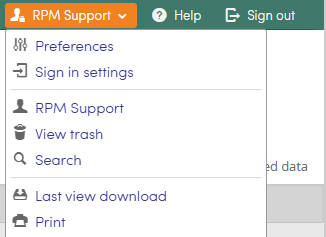
Preferences
Interface : The Interface page provides the options to change the Date and time format, how many items (forms) are displayed per page, how Accounts and Rep IDs are sorted, how Multi-select fields are displayed, and which Units are used within RPM. Take note of the information regarding Units. The units chosen in preferences will be the units if you import/update forms via import.
Default views: The Default views page provides the user with the option to manage their default views related to Agency, Reps, Customers, and Staff. The user can also manage the default view of the processes they have access to. You can change a default view by choosing a view from the drop down menu.
Date & time: The Date & time page provides the user with the option to adjust the timezone.
Email Notification: The Email notification page allows the user to turn email notification on or off. They can also manage their notifications on a process basis.
Downloads: The Downloads page gives the user the option to choose which Excel format they want download files in.
Sign in settings: To change your password, enter your current password. Enter a new password and then confirm it by re-typing in. Click OK when finished.
Username: Click on your username to view logon info, commitments, and get quick access to all processes your username is referenced in, Participant in, and Owner of.
View Trash: View trash will show all forms in the trash. Depending on your role's permission you may or may not be able to restore items from the trash. Contact your company's Lighthouse administrator if you need an item restored.
Search: The Search button will open the RPM general search page.
Last view download: Clicking Last view download will download the view you were in last if depending on your permissions.
Print: This is the general RPM print function. Wherever you are in RPM, you can print your screen with this option.