
The new Dynamic Orders in RPM Telco makes use of a lot different features in RPM to deliver a well rounded modular workflow that can be customized to track extremely complex Orders. This guide is assuming that you're using the default processes as if you were a new subscriber after Aug 01, 2019. If you're not a new subscriber some specifics of the Guide will be out of context but will still highlight how RPM Telco is handling Dynamic Orders.
Dynamic Orders is a complex and highly custom build out that can be handled with the assistance of the RPM Telco Support Team for $150/per hour. We will evaluate the needs of your Order workflow and design process flows accordingly. The below guide is for our new out of the box RPM subscription and cannot easily be plugged into an existing Order process. If your subscription does not make use of the processes to track your Orders then it is possible to adopt all these processes and start fresh.
The Requirements and Workflow
Dynamic Orders require you to have a 1:1 relationship with an account number and a single Order in your RPM. We then track all of the Order changes, multiple locations, products, and one times using the Order Modifications process and a table field within the Order depending on the requirements of reporting.
One Order can have up to 300 Order Modifications.
The Order Process
Orders in RPM represents the contract or deal that you've sold. A good Order template houses all the important information you would want to see on the contract itself, the Customer name, the MRC, the sign date, etc. For the Dynamic Orders the Order process still represents the same information but now will be the central HUB for this deal. All of the changes and updates will be stored else where but will flow back into the Order so you can reference all of that information in one spot. This
When filling in Orders now you will need to make sure that the Original MRC field is always filled in before you fill in any Order Modifications. The Original MRC field is then added to the Total Order MRC formula automatically, the Total Order MRC is also adding up the total of all the Order Detail changes so it always stays up to date. The reason for the Original MRC is so we know what the original Order was signed at.
The next 5 most important fields are the Customer Name, Agency Name, Rep Name, Account Number, and Carrier. These 5 fields are a requirement for reconciling your commissions every month. It is common for new Orders that the Account Number may not be known until the Order actually commissions, for a workflow solution to this visit here(JACKY TO ADD LINK AND WRITE ARTICLE). These are reference fields in RPM that correspond to their respective pages. If you've done any commission imports in RPM then each of these fields should have some values in them to select from. To add options to each field you'll have to go to their respective pages and add them, which is why they're called reference fields.
The Order Updates table will fill automatically as you start Order Modifications from the Order and cannot be edited on the Order level.
The Products table is where you would keep track of the original products of the Order. The Product Categories and Products are their own processes and are Process Reference Fields in this Order, so to add new options to it you would just start a form in Products Category or Products. The Product MRC(the last column in the table) will give you an accurate calculation between the QTY and $ Per Unit, the table will total up the MRC for you but you will have to still fill in a value for the Original MRC.
Critical Dates are some of the most important fields to manage on the Order, and from here you can add action triggers to notify you when an Order is about to expire by setting up a date field reminder action trigger to email you X amount of days before.
The Order Modifications Process
This is a new process that the Orders flow into. It allows for us to take a snap shot of the totals of the Order when we start the Order Modifications form and from here we can track and manage any changes for the original Order. You're only starting these forms on Orders that you want to manage separately from the main Order. Say multiple locations that have different install dates or when a Supplier gives you one account number for every detail sold to a single customer.
Order Modifications is not always needed. Only flow an Order into this process if the Order undergoes changes over it's lifespan. MACDs are generally what you're looking to use Order Modifications for.
For every Dynamic Order you must start an Order Modifications with an Add-on Type of Original, this allows the Widgets to display the original Order as well as the changes to it. After the Original Order Modifications is started you may add Order Modifications as needed for that Order.
For example an Order with a Order Modifications should always have it's first row as Original.
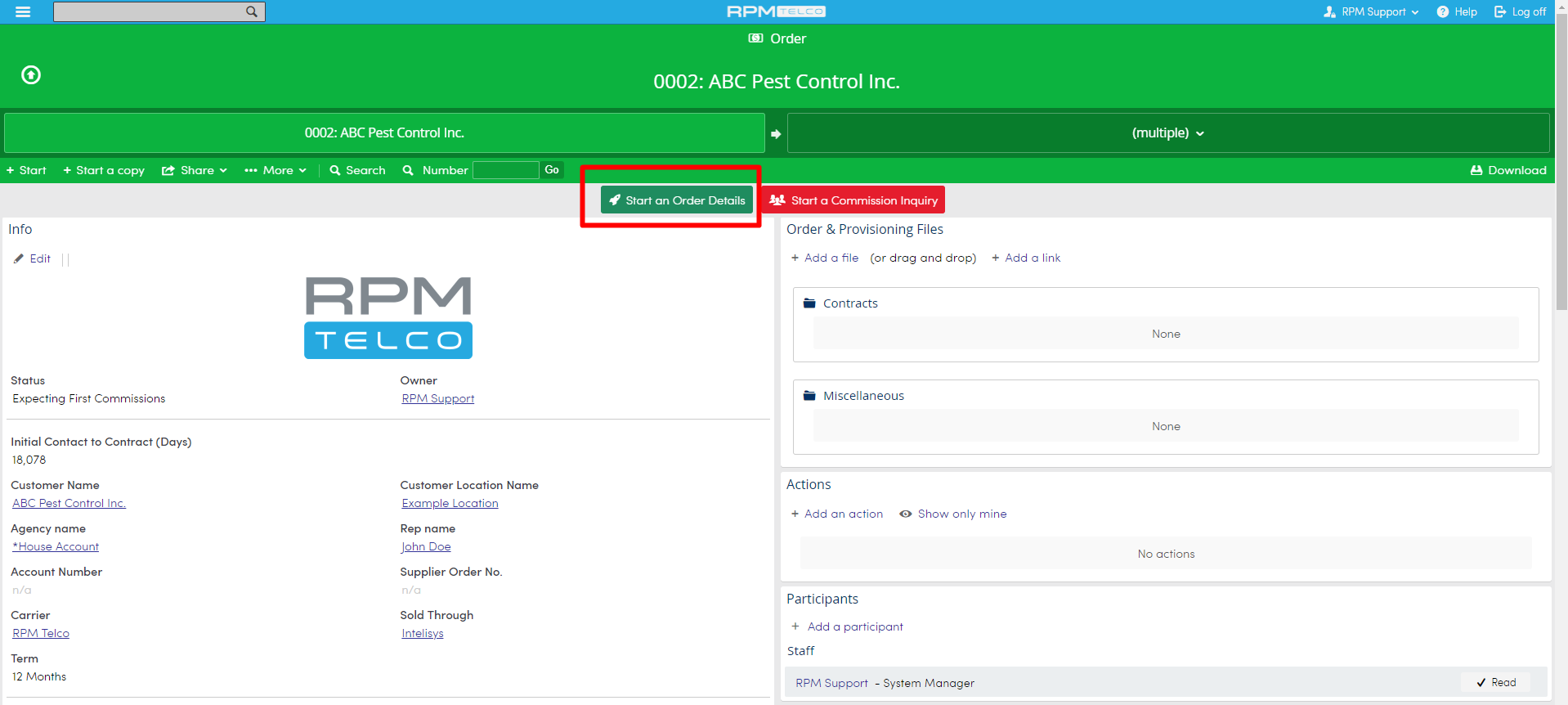
To start an Original Order Modifications go to the Order you want to start adding Details to and click the flow link.
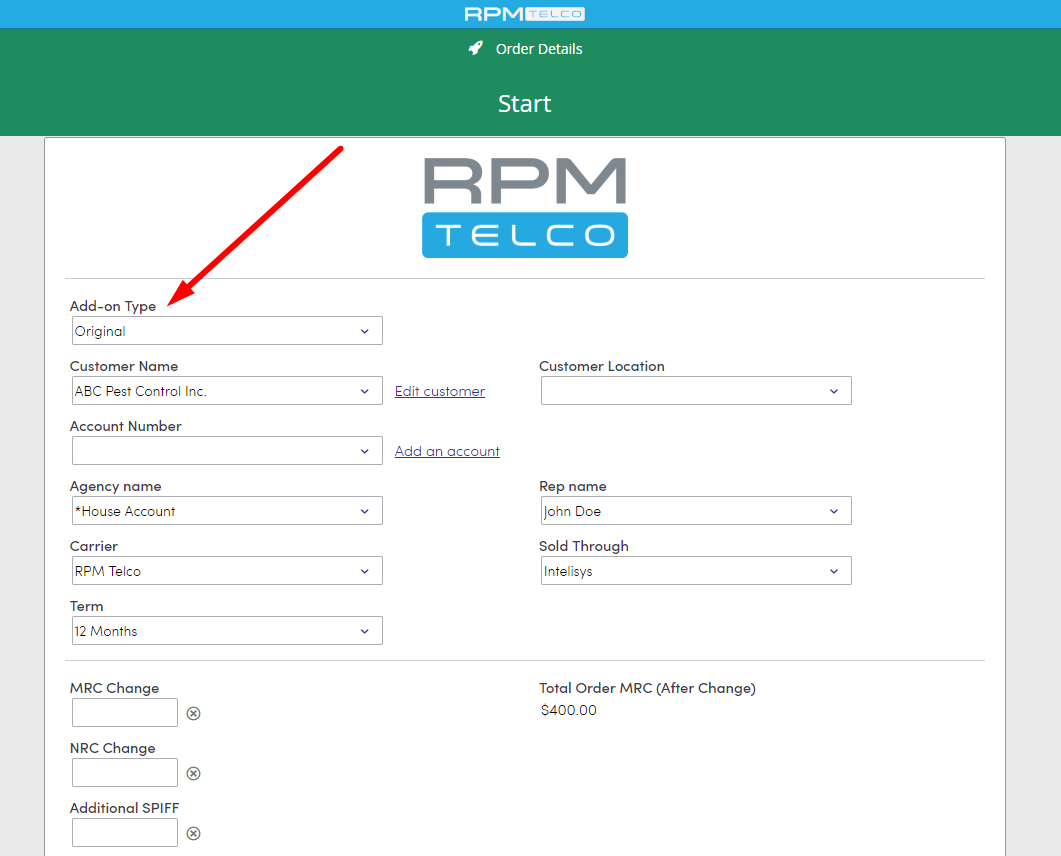
This will start an Order Modifications form. Simply select Original under Add-on Type and hit Okay.
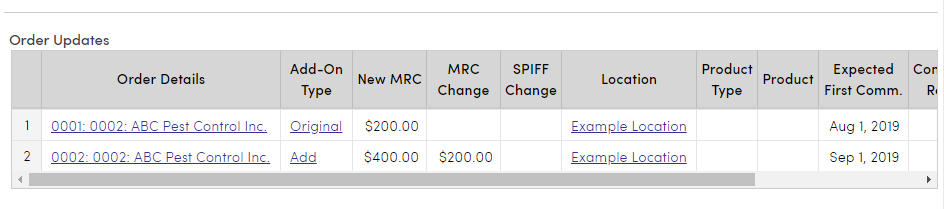
Afterwards navigate back to your Order by clicking on the flow tabs near the top of the page and confirm your Order Updates Table has it's first row as the Original


From here you can add as many different types of Order Modifications as you need to help you keep track of your Orders. However you might be wondering what kind of things do we track with this?
What Does Order Modifications Track Exactly?
Order Modifications are used to track any additional information on your Order that can not be kept on that Order due to the dynamic nature of the Order. The goal is that the Order Modifications are used to keep track of anything that happens after the initial Order is inputted into RPM. This includes all MACDs, multiple locations, and some renewals. It is not limited to the previously mentioned methods and we recommend reaching out to our support team to discuss any additional ideas that you would want to track as part of your Dynamic Orders.
Benefits of the Change
Splitting out the details of an Order into another process allows us to pass values into the new Order Modifications which gives us a snap shot of how the Order was before the change. This includes almost every field on the Order(excluding table fields) which allows us to set multiple date different dates for each Order detail.
Since the Order Modifications table fills back into the original Order it was started from we can generate each row of that table as a report, this is also why the Original Order is needed.
Some examples.
This is one Order in RPM displayed as two rows. This is due to me having the original Order detail and creating another one for an add on. My Expected First Comm date field lets me estimate when I'm going to start seeing that profit which enables accurate forecasting.

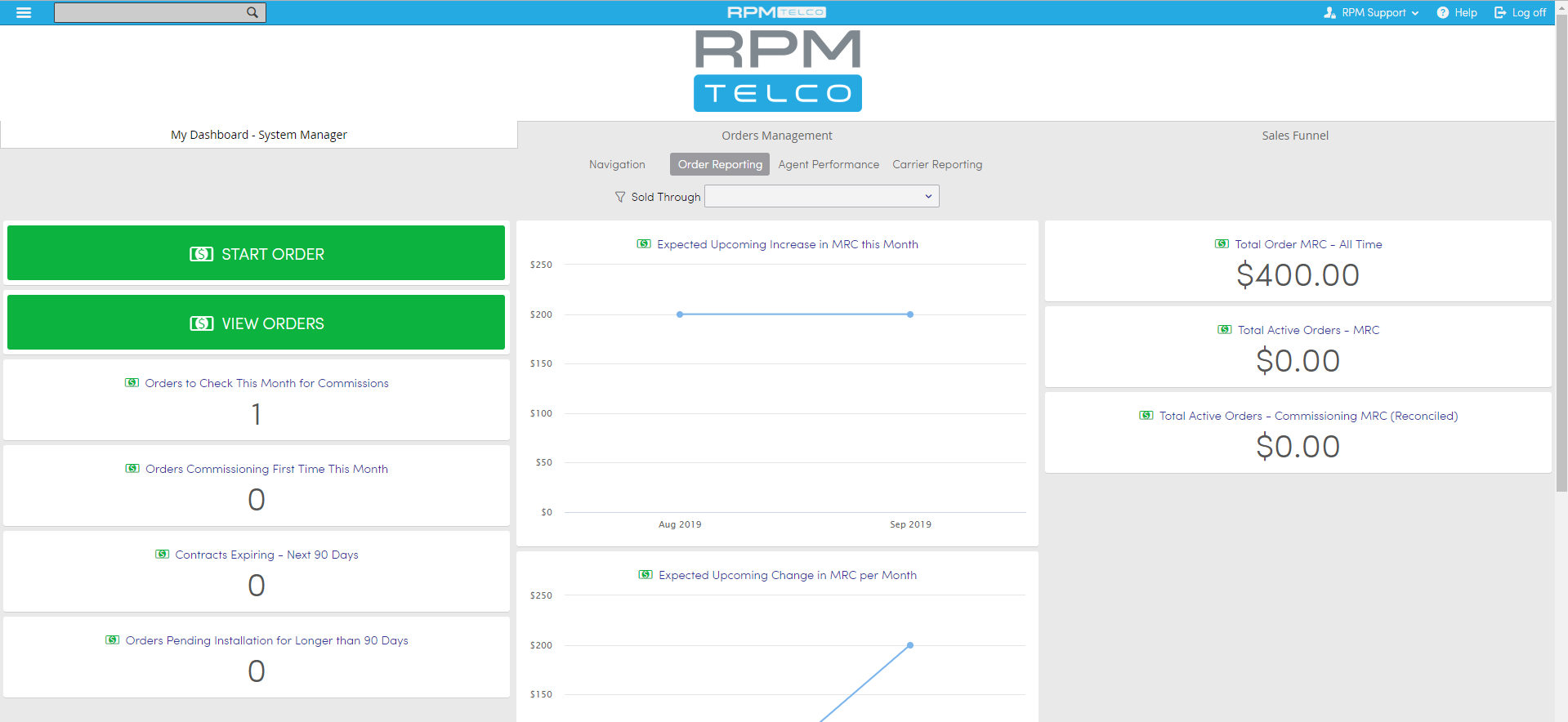
These reports can be taken a step further and placed on your Dashboard for some useful analytics at a glance.
More Details on Order Modifications
Orders flowing into Order Modifications will always pass over a bunch of information from the Order. This is to make the creation of the original Order Modifications easier. The importance of starting an original Order Modifications is to represent the original Order on any views we create. Without the Original orders the table will just show the first Order Modifications form associated with the Order, this causes the original Order to not be shown on reports. In short always start an Original Order if you're going to be adding more Order Modifications.
Adding columns to Orders from Order Modifications is done by editing the Order and adding the exact type of field you want to add to the Order Updates table. Then edit the Table fill to map the fields together. This would be the solution to adding more date fields to the table to be used in reports. An example would be wanting to add the Install dates from Details to Orders so you can say summarize all of the Install Dates in a month.
How does Reconcile Work now?
Reconcile is still working off of the Order process and has the same requirements. We're looking for 1 Order per Billing Account Number.
The Order Modifications process allows us to sum up multiple different types of Orders under the same Master Order but we're still comparing the single total MRC of the Order to the Net Billed total for the Billing Account Number.